


Complete – Medication Tracker
3.61.17K Reviews
App Specs
- Version
- 19.5
- Updated On
- License
- Free
- Downloads
- 100,000+
- Developer
- AbbVie
- Categories
- Medical
- Platform
- Android
Screenshots
 Analysis by AppCompare
Medication routines are easy to underestimate. The first few days usually feel manageable, but the real test arrives when mornings are rushed, evenings run late, or a prescription changes. Complete – Medication Tracker is a free medical app from AbbVie that aims to make those repeated tasks easier to see and remember. After spending time with it, I found its strongest quality is not novelty but structure: it gives medication information and routine awareness a more deliberate place on the phone.
That also means it is not the same kind of tool as a general reminder app. Its store summary points users toward indications and important safety information, including a boxed warning, so this is an app that should be approached as a medication companion rather than a casual checklist. I would recommend it to someone who wants a dedicated place to stay oriented around treatment information, but I would not treat it as a substitute for a pharmacist, prescriber, or urgent medical advice.
What the first week feels like
The initial appeal comes from focus. A normal alarm can remind me to do almost anything, while a medication tracker frames the reminder around a health routine. That distinction matters when several daily tasks compete for attention. Instead of relying on memory or a note buried in another app, I can open a medical tool with a clear purpose and use it as part of the same routine each day.
Complete is rated for Everyone, which makes its presentation approachable for a broad range of users. It is available at no cost, and the current release is version 19.5. The app has been available since September 9, 2015, so it does not feel like a short-lived experiment built around a passing wellness trend. AbbVie is the developer, and that medical context is important when deciding how much trust to place in the information shown inside the app.
During the first week, the most useful habit is to open the app at a consistent point rather than waiting until I am already distracted. For example, I might check it after brushing my teeth in the morning and again while preparing for bed. This makes the tracker part of an existing routine instead of creating a completely new task. That small change is more valuable than repeatedly downloading reminder apps and abandoning them after the first few days.
A practical scenario is a person who keeps medication in a kitchen cabinet but sometimes cannot remember whether the morning dose was already handled. A tracker can provide a deliberate place to check the routine instead of forcing that person to reconstruct the morning from memory. The benefit is especially clear on weekends, when the usual commute or school schedule no longer provides natural time markers.
One detail I consider essential is reading the safety material before depending on the app. The wording about indications and important safety information, including a boxed warning, is not decorative legal text. It signals that medication information needs context. A reminder can help me remember a routine, but it cannot decide whether a dose is appropriate after a missed dose, a new symptom, pregnancy, an interaction, or a change in the treatment plan.
Worth Reading Before You Choose

EA SPORTS FC Mobile 26 Is a Bigger Football Game, but It Takes Time

Flipboard Shows What News Apps Must Do Beyond the Feed

Switching to Android Auto Means Rethinking Your Driving Routine

Google Calendar Makes a Crowded Week Easier to Manage

Ludo King Makes the Most of the Minutes Between Plans

Baby Panda World Brings Quick Play to Modern Phones, but Its Game Library Feels Busy
That is also where the first-week experience can become less smooth. A user looking only for a simple alarm may find the medical framing heavier than expected. Someone who wants a highly customizable household organizer may prefer a general reminder application. Complete is more suitable when the user values medication-specific attention over a broad task-management system.
Setting expectations before relying on it
I would start by treating the app as one layer in a larger safety routine. Keep the prescription label available, know which clinician or pharmacy to contact, and avoid assuming that a completed reminder means the treatment itself has been medically reviewed. This is a small but important distinction: the app can support consistency, while professional advice remains the authority for changes and questions.
It is also worth deciding who will actually use it. A person managing one stable routine may find the focused approach comfortable. A caregiver coordinating several people, complex schedules, or frequent changes may need a more comprehensive medication-management service or direct support from a pharmacy. The app can still be useful in that situation, but it should not be expected to solve coordination problems on its own.
Why it may still matter after the novelty fades
The lasting value of a medication tracker is measured in ordinary weeks, not the excitement of the first setup. If I only open it when starting a new prescription, its usefulness is temporary. If it becomes part of checking a recurring treatment routine, it has a better chance of earning permanent space on the phone. That makes consistency more important than visual novelty or the number of times I interact with it.
Complete has reached more than one hundred thousand installs and holds an average rating of 3.6 from around two thousand ratings. Those figures suggest a real audience but also a mixed experience rather than universal approval. I read that as a reason to judge the workflow personally: a medication app can be genuinely helpful for one routine and frustrating for another, depending on how much detail and flexibility the user expects.
Month to month, I see three recurring benefits. First, the app can keep medication-related attention separate from entertainment, messaging, and ordinary to-do lists. Second, it encourages a repeatable check-in instead of relying entirely on memory. Third, it can make a treatment routine feel more visible, which is useful when health tasks are easy to postpone or mentally blur together.
The less obvious benefit is that it can expose weak points in a routine. If I repeatedly ignore a reminder at the same time, the problem may not be forgetfulness. The medication may be stored in an inconvenient place, the chosen moment may collide with school or work, or the routine may be too easy to overlook. I would use those repeated misses as a prompt to redesign the environment, not simply blame myself or add more alerts.
For example, a user who travels between home and work might discover that a single location-based habit is unreliable. Rather than assuming the app has failed, that person can establish a consistent check before leaving home and keep the prescribed medication in a safe, appropriate place according to professional guidance. The tracker works best when it supports a physical routine that has already been thought through.
Another useful approach is to review the routine at the same time each week. I would check whether the reminders still match the current treatment instructions and whether life changes have made the chosen times unrealistic. This is not a reason to alter medication without advice. It is a maintenance check to identify when the app’s information or the surrounding habit may need professional confirmation.
Where it compares well with ordinary reminders
A standard alarm is often quicker to create and may offer more general customization. It is a good choice for someone who only needs a discreet prompt and already has a reliable way to manage medication information. A calendar can be better for appointments, refills, and one-off events. A notes app can hold instructions, but it usually depends on the user creating a safe and orderly system.
Complete makes more sense when the user wants medication to remain the central subject. That focus reduces the chance that a health reminder gets lost among shopping lists and work tasks. The trade-off is that it may feel less versatile than a general productivity tool. I would choose it for a person who wants a dedicated medication space, not for someone trying to manage every health, household, and scheduling need from one application.
It also should not be compared directly with a clinical record or a pharmacist’s medication review. Those resources answer different questions. A tracker helps with day-to-day awareness; a clinician evaluates treatment; a pharmacist can clarify instructions and interactions. The safest long-term setup may involve all three roles, with the app handling routine support rather than medical judgment.
The maintenance burden is small, but not zero
Every medication app creates a maintenance obligation. Information must stay aligned with the current prescription, and the user must notice when a treatment changes. That burden is easy to ignore because the app looks like a reminder tool, but stale information can be more misleading than no information at all. I would therefore review entries whenever a clinician changes the dose, timing, or medication itself.
The key trade-off is convenience versus attention. A dedicated tracker can reduce the mental effort of remembering, but it adds another place to maintain. If I already use a pill organizer, a pharmacy service, and a family calendar, Complete may become one more system to keep synchronized. In that case, the app earns its place only if it prevents confusion rather than creating duplicate work.
My practical rule would be to keep one source of truth for medical instructions. The prescription label and healthcare professional should define what to take and when. The app can reflect that plan, but it should not become the place where I independently rewrite instructions from memory. When something changes, I would update the tracker only after confirming the details.
This is especially important for people who share care responsibilities. A family member may help with reminders, but access to someone else’s medication routine carries privacy and safety implications. I would avoid casually handing over control of the phone or assuming that a relative can interpret a warning correctly. For a child, older adult, or person with cognitive difficulties, the app should sit inside a broader care plan with clear human responsibility.
Another maintenance issue is emotional rather than technical. A missed reminder can produce guilt, especially for someone already worried about their health. I prefer to treat a missed prompt as information about the routine: what interrupted it, and what can be made easier next time? If the app turns every imperfect day into self-criticism, a simpler system or direct support from a healthcare professional may be a better choice.
When the routine starts to feel tiring
Notification fatigue is the most obvious risk. A reminder that is useful at first can become background noise when it appears at an inconvenient time or when the user is asked to confirm the same action without feeling any immediate benefit. I would choose reminder moments that connect to stable daily events and avoid creating a dense cluster of alerts around an already busy part of the day.
There is also information fatigue. Medical warnings deserve attention, but repeatedly seeing serious safety language can feel intimidating if the user does not understand what applies to their treatment. That is why I would read the relevant information calmly and discuss uncertainties with a clinician or pharmacist instead of trying to interpret every warning alone.
Some users may tire of opening a separate app when the phone’s built-in reminders already work. That is a legitimate reason to skip Complete. Its value depends on whether the medical focus changes behavior. If the user dismisses it automatically and never checks the surrounding information, a basic alarm may be more honest and easier to maintain.
People with changing prescriptions should be particularly cautious about settling into autopilot. A tracker can make a routine feel stable even when the treatment has changed. I would build a deliberate review into every medication transition and never assume that yesterday’s reminder remains correct today. The app is most dependable when paired with active attention at those moments.
There is a similar issue for complex schedules. If treatment involves different instructions on different days, occasional doses, or several people, the user should test whether the workflow remains understandable before relying on it. Confusion is a warning sign. When a routine becomes difficult to represent clearly, a pharmacist-prepared system, caregiver plan, or more specialized medication-management option may be safer.
Who should keep it installed?
I think Complete is a good fit for adults who want a focused medication companion, people beginning to build a consistent treatment habit, and users who find ordinary alarms too disconnected from their health routine. It is also reasonable for someone who wants safety information close at hand while remembering that the app does not replace professional care.
I would be more hesitant to recommend it as the only system for a caregiver managing several patients, a person whose prescriptions change frequently, or anyone needing detailed clinical reconciliation. Those users may benefit more from direct pharmacy coordination or a tool designed around shared care and comprehensive records. A general reminder app may also be better for someone who wants a minimal prompt with no medical reading or dedicated workflow.
The app’s free price removes one common barrier to trying it, and the broad age rating makes it easy to consider for many households. Still, free access does not remove the need for careful setup. The important question is not whether it costs anything, but whether it reduces missed routines without adding confusion or duplicated maintenance.
For me, the best test is simple: after several ordinary weeks, do I check it naturally, and does that check help me act more consistently? If yes, it has earned its place. If I keep dismissing it, maintaining duplicate information, or feeling less certain after using it, I would remove it and choose a simpler arrangement.
Complete – Medication Tracker has lasting potential because medication routines are recurring by nature. Its usefulness is not based on entertainment or a one-time burst of motivation; it comes from giving repeated health tasks a dedicated home. That strength is also its limitation, because a focused medical app asks for responsible upkeep and cannot make clinical decisions.
My final view is cautiously positive. I would recommend trying it to a friend who wants a medication-specific routine and is willing to review the information whenever treatment changes. I would not recommend relying on it blindly, using it as a substitute for medical advice, or keeping it installed merely because it was useful during the first week. The app earns lasting space only when it turns medication awareness into a calm, repeatable habit rather than another source of digital noise.
Pros
- Tracks doses
- schedules
- and medication details in one place.
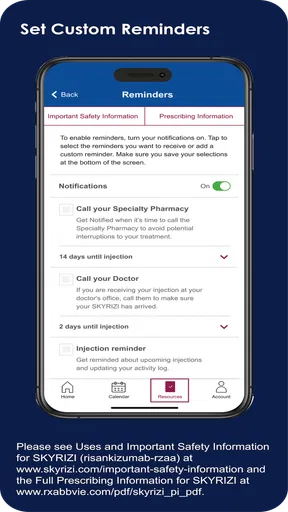
- Custom reminders can help reduce missed doses.
- Supports multiple medications and treatment routines.
- Useful history makes it easier to review adherence over time.
- Simple design is suitable for everyday health management.
Cons
- Some features may require time-consuming manual data entry.
- Reminder reliability depends on notification permissions and device settings.
- Not a substitute for medical advice or professional treatment guidance.
- Limited value for users managing only occasional medications.
- Privacy concerns may arise when storing sensitive health information.
FAQs for Complete – Medication Tracker
What is Complete – Medication Tracker used for?
Complete – Medication Tracker is designed to help you organize and monitor your medications in one place. You can typically record prescriptions, supplements, dosage instructions, schedules, and refill information, then use reminders to help you take each item on time. It is especially useful for people managing several medicines or supporting a family member’s routine.
Can Complete – Medication Tracker replace advice from a doctor or pharmacist?
No. Complete – Medication Tracker is an organizational tool, not a medical professional or diagnostic service. Its reminders and medication records should not be treated as confirmation that a treatment is safe, correct, or suitable for you. Always follow the instructions provided by your doctor or pharmacist, and ask a qualified healthcare professional before changing, stopping, or combining medications.
Does the app send reminders for every medication dose?
The app is intended to help users create schedules and receive notifications for medication doses, but the exact reminder options may depend on the current version, device settings, and permissions granted. Notifications can also be affected by battery-saving modes, silent settings, or disabled alerts. After installation, carefully review each schedule and test reminders before relying on them.
Can I track medications for more than one person?
Complete – Medication Tracker may be useful for managing medication routines for yourself and other household members, depending on the profiles and tracking features available in the version you install. Before entering sensitive information, check whether separate profiles, sharing, or caregiver tools are supported. Make sure each person’s medication details are clearly labeled to avoid confusing schedules or dosages.
Is my medication and health information private in Complete – Medication Tracker?
Medication records can contain sensitive personal health information, so privacy should be considered before using any tracking app. Review the app’s privacy policy, permissions, data-storage practices, and any options for account synchronization or cloud backup. Avoid entering information you are uncomfortable sharing, protect your device with a secure lock, and keep the application updated for security improvements.


